Your Excel numbers, live on your desktop.
Pick any cell in your spreadsheet. CellPin turns it into a small tile on your desktop that updates by itself. Sales today, cash in the bank, items low in stock. No more opening the file to check.
Free forever for 2 tiles. No account, no sign up. Your files never leave your PC.
See it in one minute
Pin two numbers from an Excel file, then change them in Excel and watch the tiles follow.
Three clicks, then forget about it
CellPin reads your Excel file directly. You do not need to change your spreadsheet or learn anything new.
Choose your file
Any .xlsx, .xlsm or .csv file on your PC, OneDrive or a shared folder.
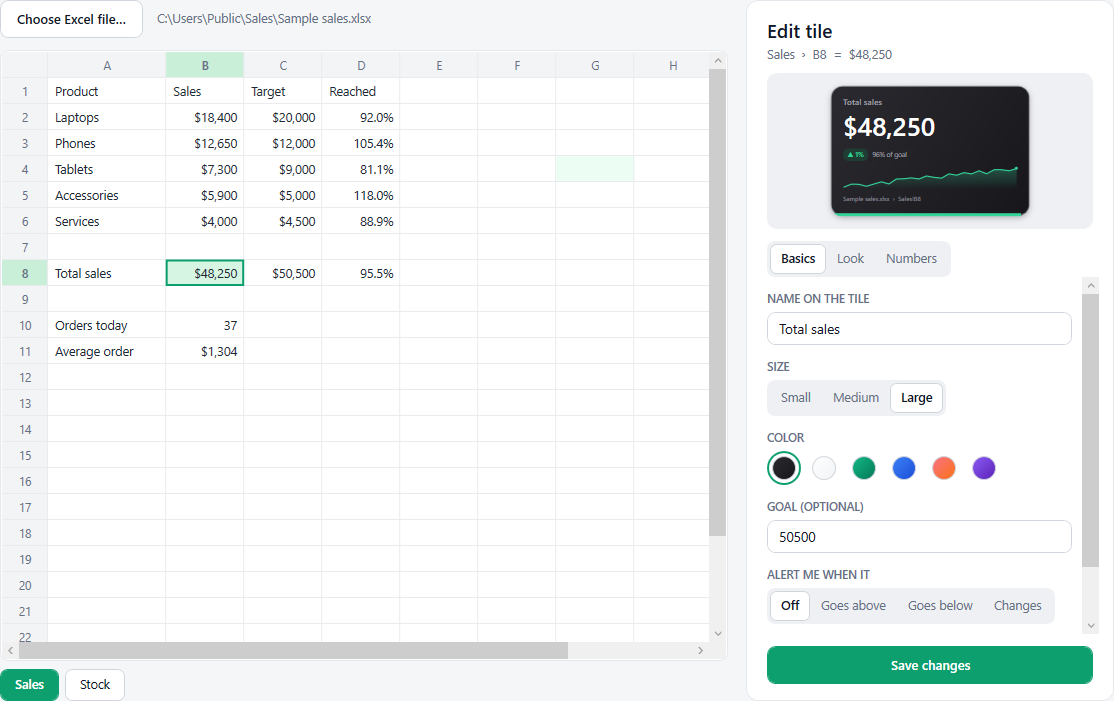
Click the cell
Your sheet opens inside CellPin. Click the number you care about and give it a name.
Pin it
A tile appears on your desktop. When the file changes, the tile changes too.
Small tile, lots of brains
Everything you need to keep an eye on the numbers that matter.
Live while you type
When the file is open in Excel, tiles follow your changes in a few seconds, even before you save.
Alerts
Get a notification and a sound when a number goes above or below your limit, or simply changes.
History and trend
Each tile remembers its values, draws a small chart and shows the change since yesterday or last week.
Goals
Set a target and watch the progress bar fill. The tile can turn red when a number crosses a line.
Make it yours
Any color, three sizes, zoom, see-through, corner shapes, fonts, short numbers like 48.3K, and text like MAD or kg.
Private by design
CellPin works offline. Your spreadsheets are read on your PC and never sent anywhere.
Made for people who live in Excel
Shop owners, accountants, managers, freelancers, anyone with a spreadsheet they check ten times a day.
Simple pricing. Pay once.
Start free. Unlock everything when you need more tiles.
Free
$0
Forever
- 2 live tiles
- Live updates and alerts
- History charts and goals
- All colors and styles
Full version
$19 one time
- Unlimited tiles
- Everything in Free
- All future updates of version 1
- Use it on your own PCs
Pay with Bitcoin, USDT or Solana
Questions
Do I need Excel installed?
No. CellPin reads .xlsx, .xlsm and .csv files by itself. If Excel is installed and the file is open, tiles also update live while you type.
Windows says "Windows protected your PC". Is it safe?
Yes. Windows shows this message for new apps that are not yet widely downloaded. Click "More info", then "Run anyway". CellPin does not need administrator rights and installs nothing.
How do I pay?
With Bitcoin, USDT or Solana. Choose your coin on the payment page, send the amount shown to the address shown, then send us your transaction ID on WhatsApp or by email.
How do I get my license key?
As soon as we see your payment, we send your key on WhatsApp or by email, usually within a few hours and always within 24 hours. Open CellPin, click "Unlock more" at the top, paste the key and click Unlock.
Does it work with OneDrive, Google Drive or a network folder?
Yes, as long as the file is synced to a folder on your PC. CellPin notices when the file changes and updates the tiles.
Does it work on Mac?
Not yet. CellPin is made for Windows 10 and Windows 11.
Can I get a refund?
Yes. If CellPin does not work for you, ask within 14 days of your purchase and we send the same amount of the same coin back to you.
Stop opening the file just to check one number.
Download CellPin, pin your first number, and see it live in under a minute.